Analyzing the Supply Chain Attack on LiteLLM: TeamPCP's Expanding Supply Chain Campaign
litellm, with nearly 500 million downloads, was silently turned into a credential-stealing trojan on PyPI, likely as a direct consequence of the recent Trivy compromise

TL;DR
LiteLLM versions 1.82.7 and 1.82.8 on PyPI were compromised with a credential-stealing payload - likely by TeamPCP using secrets stolen via the recent Trivy attack. The v1.82.8 payload runs on every Python startup, no import needed. If you use litellm, check whether you’re affected, and rotate all credentials on any impacted system.
Full analysis below.
What’s LiteLLM?
If you work with large language models, there’s a good chance you’ve used - or are running - litellm. It is one of the most popular AI gateway projects, with over 40,000 GitHub stars, 483 million PyPI downloads, and adoption by companies including Stripe, Netflix, and Google ADK. As one of the most widely used AI infrastructure packages in the Python ecosystem, it lets developers call over 100 LLM APIs through a single unified interface - write your code once, swap providers with a config change.
How the LiteLLM payload works
The two affected versions use different delivery mechanisms:
v1.82.8 contains a malicious
.pthfile (litellm_init.pth) that executes automatically on Python startupv1.82.7 embeds the payload directly in
proxy/proxy_server.py, which executes when the litellm proxy is used
The v1.82.8 trigger: a .pth file
The more dangerous of the two is v1.82.8. It uses a file called litellm_init.pth (34,628 bytes) to achieve automatic execution.
Python has a little-known feature: any file ending in .pth that’s placed in a site-packages directory gets executed automatically when the Python interpreter starts up. Not when you import the package. Not when you call a function. Every single time Python runs - including scripts, notebooks, CI jobs, and background services.
This means the payload activates even if your code doesn’t use litellm at all. If the package is installed in your environment, you’re affected.
Stage 1: Harvesting everything
Once triggered, the payload collects sensitive data from the host system:
SSH keys and configs - private keys, authorized keys, known hosts
Cloud credentials - AWS, GCP, and Azure credential files, plus IMDS token harvesting for cloud-hosted environments
Kubernetes secrets - kubeconfig files, admin configs, service account tokens, and cluster secrets across all namespaces
Environment variables - every API key, database password, and secret token set in the environment
Git credentials -
.gitconfig,.git-credentialsDocker configs - registry authentication tokens
Database credentials - PostgreSQL, MySQL, Redis, LDAP config files
Shell history - bash, zsh, MySQL, PostgreSQL, and Redis command history
CI/CD secrets - Terraform variables, GitLab CI, Travis, Jenkins, and Drone configs
Cryptocurrency wallets - Bitcoin, Ethereum, Solana, Monero, and others
SSL/TLS private keys - from
/etc/ssl/private/and Let’s Encrypt directories
Stage 2: Encrypted exfiltration
The collected data isn’t sent in the clear. The payload generates a random AES-256 session key, encrypts all harvested data, then encrypts the session key itself using a hardcoded 4096-bit RSA public key. The encrypted bundle is sent via HTTPS POST to models.litellm.cloud - a domain designed to look like legitimate litellm infrastructure (the real domain is litellm.ai).
This means even if you captured the network traffic, you couldn’t read what was sent without the attacker’s private key.
Stage 3: Lateral movement in Kubernetes
For environments running Kubernetes, the payload goes further. It reads all cluster secrets across all namespaces and attempts to create a privileged alpine:latest pod on every node in the cluster - essentially trying to gain root-level access to every machine in your infrastructure.
Persistence
The malware installs itself to survive beyond the initial execution:
~/.config/sysmon/sysmon.py- a local backdoor disguised as a system monitoring tool~/.config/systemd/user/sysmon.service- a systemd service to ensure the backdoor restarts automaticallynode-setup-*pods in thekube-systemnamespace - blending in with legitimate Kubernetes system pods
Additional details are available on GitHub Issue #24512, where the community is tracking the issue. Note that issue has been flooded with what seems to be dozens of bot-generated comments - generic responses like “Thanks, that helped!” and “Worked like a charm, much appreciated” posted by different accounts within seconds of each other:
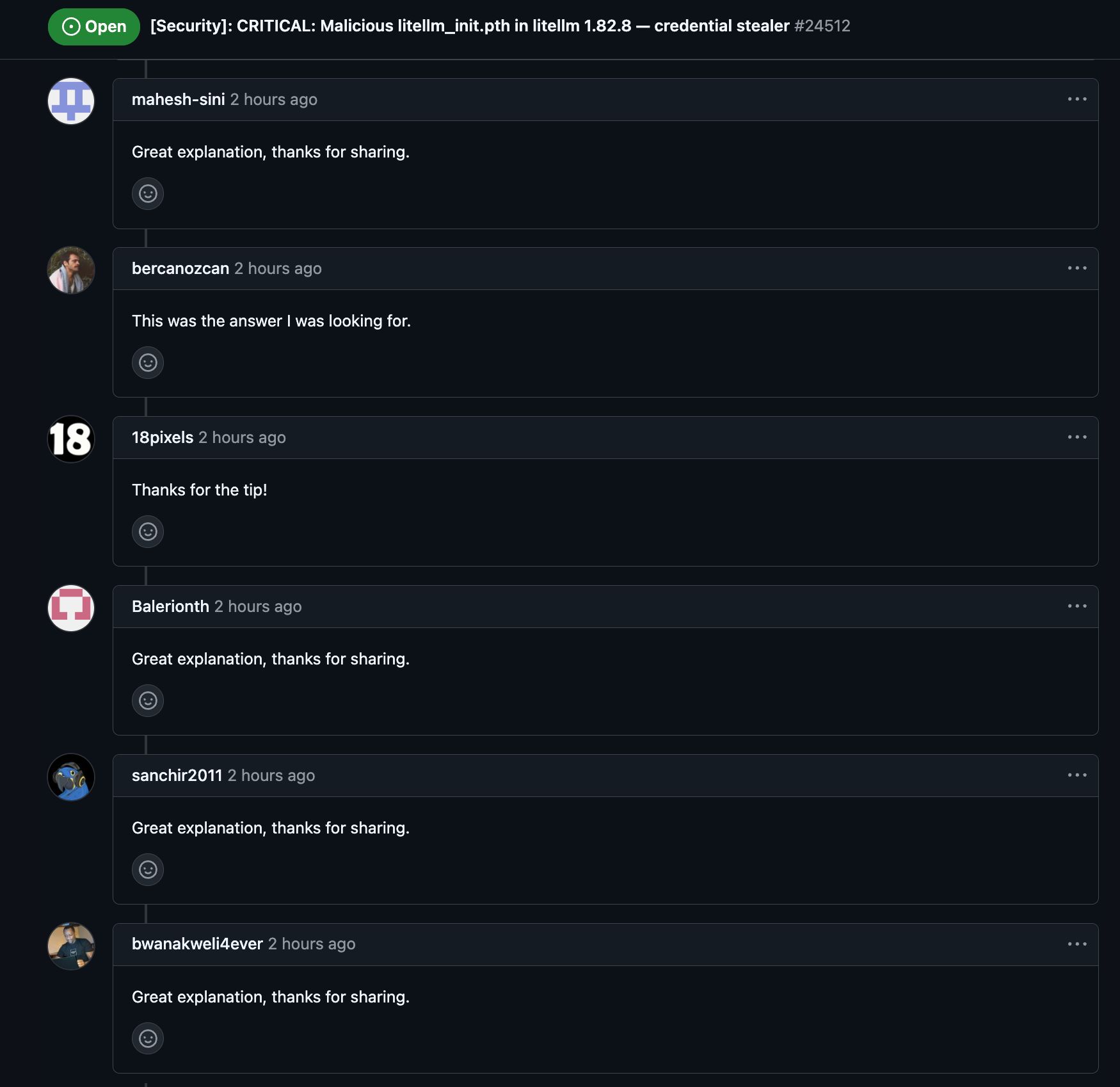
This appears to be a deliberate attempt to bury legitimate technical discussion and slow down the community’s response
PyPI’s response
PyPI admins responded quickly - within approximately 3 hours of the compromised packages being published - and quarantined the entire project. The project page now displays:
“This project has been quarantined. PyPI Admins need to review this project before it can be restored. While in quarantine, the project is not installable by clients, and cannot be modified by its maintainers.”
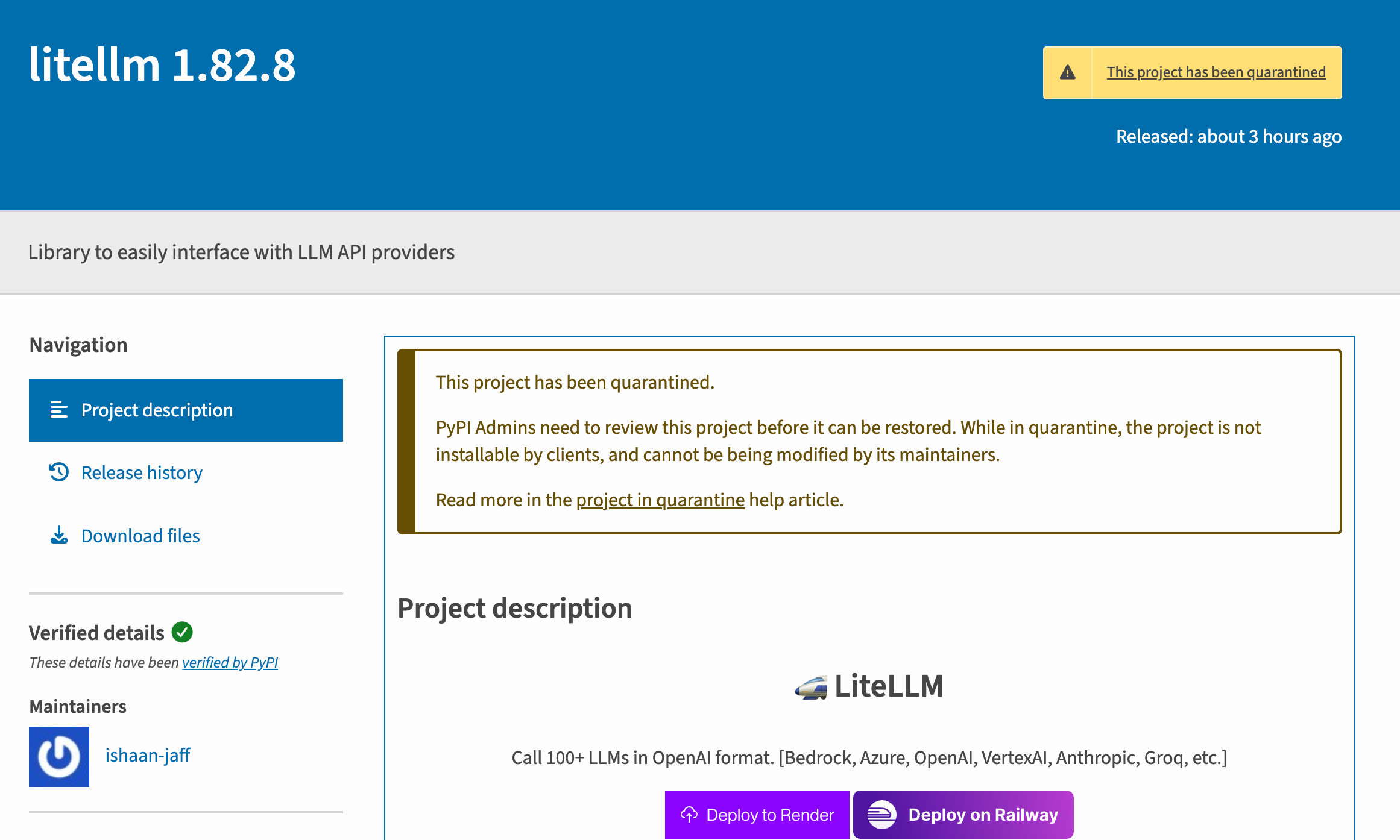
Three hours is a fast response, but for a package with litellm’s download volume, that window is significant. Any automated pipeline, Docker build, or developer environment that pulled a fresh install during that period could have received the compromised version.
This means pip install litellm currently fails for all versions, not just the compromised ones. While disruptive, this is the right call - it prevents any further exposure while the situation is investigated.
The Broader Concern & The TeamPCP connection
This attack did not happen in a vacuum. It is very likely a direct consequence of the Trivy supply chain compromise carried out by the threat actor known as TeamPCP.
The Trivy attack: a quick recap
Starting in late February 2026, TeamPCP exploited a misconfiguration in the CI/CD environment of Aqua Security’s Trivy - one of the most widely used open source vulnerability scanners. They extracted a privileged access token and established a foothold in the project’s release automation. On March 1, the Trivy team disclosed the incident and rotated credentials, but the rotation was incomplete. The attacker retained residual access.
On March 19, TeamPCP struck. They force-pushed 76 of 77 version tags in trivy-action and all tags in setup-trivy, redirecting trusted references to malicious commits. They simultaneously triggered a malicious Trivy v0.69.4 release. The payload harvested API tokens, cloud credentials, SSH keys, Kubernetes secrets, and CI/CD secrets from every pipeline that ran the compromised action - and did so silently, before the legitimate scan logic, so workflows appeared to complete normally.
The Trivy team contained the initial attack within about three hours, but on March 22, Aqua disclosed that the attacker had re-established access, describing “additional suspicious activity involving unauthorized changes and repository tampering.” As of March 24, the investigation remains active with incident response firm Sygnia.
The following day, March 23, TeamPCP compromised the KICS GitHub Action - Checkmarx’s infrastructure-as-code security scanner - hijacking all 35 repository tags and injecting credential-stealing payloads using the same RSA public key. The related ast-github-action and two OpenVS extensions were also compromised.
Notably, Aqua’s latest update confirms what the litellm compromise now illustrates in practice:
“The threat actor has pivoted beyond the initial CI/CD compromise and is actively weaponizing stolen credentials across the broader ecosystem. Organizations should treat this as an ongoing campaign, not a contained incident.”
Aqua also warns that stolen NPM publish tokens are being used to propagate malware across the NPM ecosystem - meaning TeamPCP’s reach extends beyond Python.
The LiteLLM Connection
The fingerprints are unmistakable. Both attacks use the same playbook:
Hybrid AES-256-CBC + RSA-4096 encryption for exfiltration
Credential harvesting across SSH, cloud providers, and Kubernetes
Kubernetes lateral movement via privileged pod creation
Persistence through disguised system services
The “tpcp” marker - the litellm payload bundles stolen data into
tpcp.tar.gz, while the Trivy attacker created exfiltration repositories namedtpcp-docs. Both names reference TeamPCP.LiteLLM’s CI/CD pipeline runs Trivy as its security scanner.
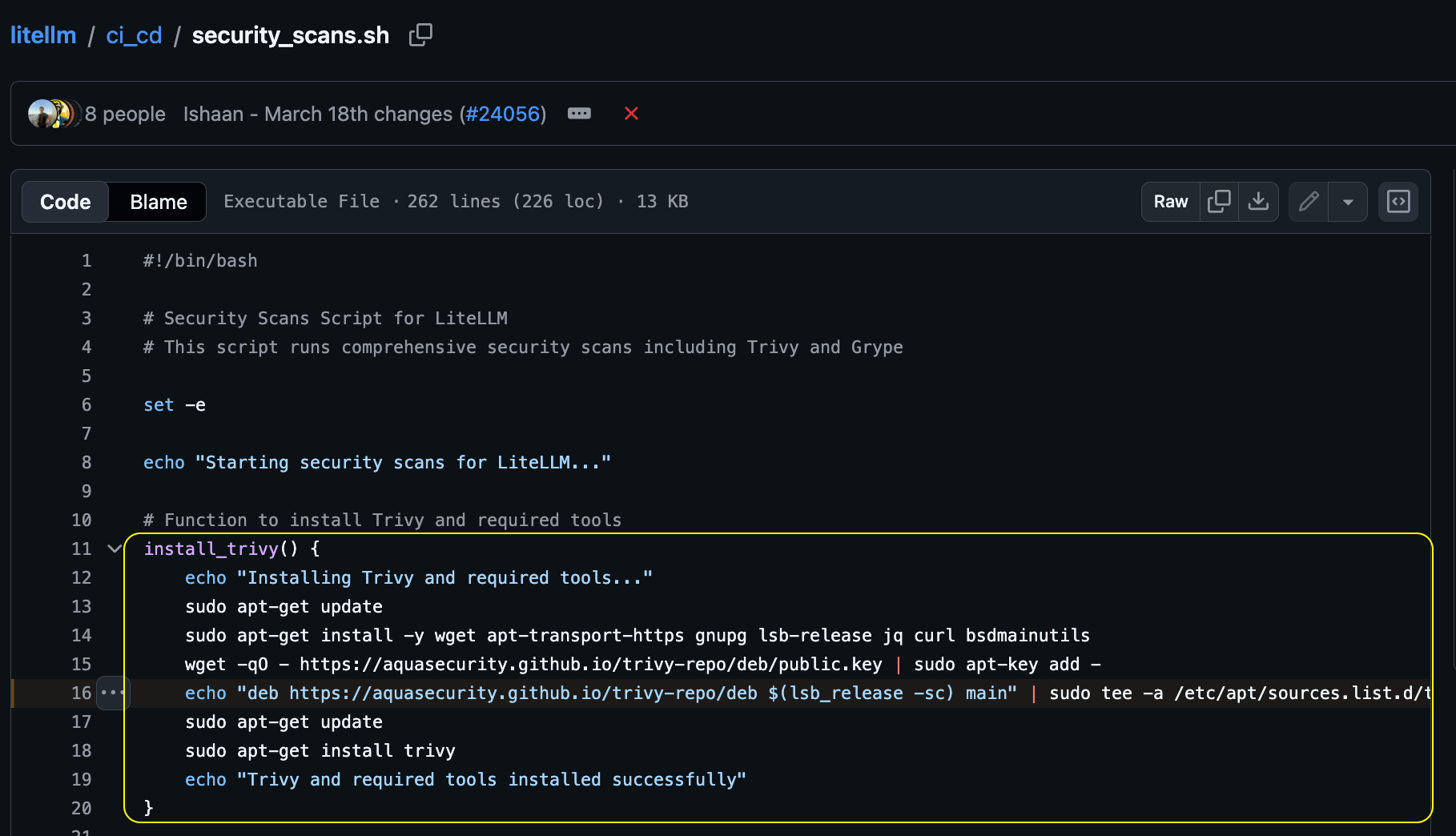
The likely attack chain: when litellm’s CI/CD ran a compromised Trivy version or action, TeamPCP harvested the pipeline’s secrets - including the PyPI publishing token. They then used that token to upload malicious litellm packages directly to PyPI, bypassing GitHub entirely.
The timeline fits: Trivy compromised on March 19, attacker regains access on March 22, KICS compromised on March 23, litellm compromised packages appear on March 24.
On the same note, it is very likely that other repositories under the BerriAI GitHub organization are also compromised. If the attack vector was credential theft via the Trivy compromise, any secrets present in litellm’s CI/CD environment - including publishing tokens for other packages - may be in the attacker’s hands. Any package published through the same infrastructure should be treated as suspect until verified. If you depend on other BerriAI-maintained packages, exercise caution and audit your installed versions.
Am I affected?
You’re potentially affected if:
You installed
litellm==1.82.7orlitellm==1.82.8from PyPI at any pointYour
requirements.txt,poetry.lock,uv.lock,Pipfile.lock, or any other lock file pins either of those versionsAny CI/CD pipeline, Docker image, or cloud environment pulled one of those versions
Remember: the payload runs on Python startup, not on import. If the package was installed, the damage may already be done.
Quick check
Look for the malicious .pth file:
find "$(python3 -c 'import site; print(site.getsitepackages()[0])')" \
  -name "litellm_init.pth" 2>/dev/null
Or check your installed version:
pip show litellm 2>/dev/null | grep Version
We’ve also published a comprehensive scanner script - check_litellm_compromise.sh (available in the following GitHub Gist )- that checks installed versions, lock files, persistence artifacts, Kubernetes pods, and active network connections. It’s entirely read-only and makes no changes to your system.
What to do if you’re compromised
Assume the worst. If either affected version was installed on a system, treat every credential on that system as leaked.
Uninstall immediately:
pip uninstall litellmRemove persistence artifacts:
Delete any
litellm_init.pthfrom your Python site-packagesRemove
~/.config/sysmon/and~/.config/systemd/user/sysmon.serviceIn Kubernetes, delete any
node-setup-*pods inkube-system
Rotate everything: SSH keys, AWS/GCP/Azure credentials, API tokens, database passwords, Docker registry tokens, CI/CD secrets - anything that was on the affected system as a file or environment variable
Audit access logs: Check cloud provider audit trails (AWS CloudTrail, GCP Audit Logs, Azure Activity Log) for unauthorized access using potentially stolen credentials
Reinstall a safe version once the quarantine is lifted, or pin to a known-good version.
The bigger picture
As covered above, this is part of an active campaign by TeamPCP that has already hit Trivy, litellm, and - per Aqua’s own warning - the NPM ecosystem. A security scanner was turned into the vector that compromised an AI gateway running in production across thousands of organizations. Your security tools are part of your attack surface.
If your organization depends on open source infrastructure, this is a good time to revisit some fundamentals:
Pin dependencies to exact versions and preferably even commit SHAs as mutable version tags are how the Trivy attack propagated.
Use lock files and verify checksums.
Minimize secrets in CI/CD environments - if a pipeline doesn’t need a PyPI token, don’t give it one.
Monitor for unexpected network activity from your Python processes.
Audit your credential exposure - if a secret is on disk or in an environment variable, a compromised dependency can read it.
Check for
tpcp-docsrepositories in your GitHub organization - their presence may indicate successful exfiltration via the Trivy vector.
We will update this post as more details emerge…
Thanks for reading! This post is public so feel free to share it.
At Pluto, we’re enabling enterprises to use AI Builders securely.
Want to learn more? Let’s talk.